C-Media CM6206 Enabler for Mac OS X v2.1
by Alexander Thomas (aka Dr. Lex)
Note
This is broken in Mac OS X 10.15 ‘Catalina’. First of all, the installer no longer works because of stricter security. Moreover, the program is not 64-bit, so it still won't run even if you would be able to bypass the installer. Because I no longer use this kind of sound card and have little time to work on this, I have zero motivation fo fix this. Do not expect any help if you mail me for support. Your best option if you have a minimum of experience with XCode, is to download the source code (ZIP archive) and try to build a 64-bit binary. If you succeed, it would be nice if you could send me either that binary or a link to where it can be downloaded, so other people can also use it. Even better would be if you would share it as a GitHub project or the like and notify me so I can link to it from here.
If the installer still works on your machine but you get an error “e00002c5,” then this may be of help, although I have heard reports that getting kexts to work in Monterey is a total pain, or even just impossible.
What is it?
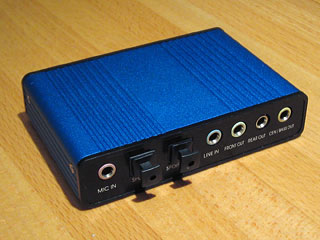
This is a small program that activates the analog and S/PDIF outputs on USB devices that are based on the C-Media CM6206 multi-channel sound chip (sometimes also referred to as CMI6206). One of the common cheap devices sold on eBay that uses this IC can be seen in the photo at the right. It is a 5.1 device but the IC supports up to 7.1 audio. The one I bought had a serial number “29776659” but there are other products that use this IC. Some major brands also use this chip, for instance Zalman uses it in their ZM-RS6F USB headphones. The Sweex SC016 is also based on the CM6206, as is the Diamond XS71U.
The CM6206 chip is a fully compliant USB audio device that should work as-is on any modern operating system without requiring drivers. At first sight it does work: the sound card can be selected in the audio control panel and the 6 or 8 channels can be assigned using Audio MIDI setup. But there is no sound output. The same symptoms occur in Windows until the C-Media driver is installed. Apparently the device boots with its outputs disabled, and the only thing the ‘driver’ does is send some specific configuration requests to enable both the analog outputs and the optical S/PDIF.
Therefore I started gathering information: I used a USB sniffer to look at the packets sent to the device in Windows with and without the driver installed, and I found some useful clues in the Linux ALSA driver source code (more specifically the usbaudio.c file) and mailinglist. Combined with some sample code from the XCode Developer kit, I managed to create a simple program that sends the crucial packets, enabling both the analog outputs and the S/PDIF. So there you have it, surround sound on your Mac for the price of a cheap USB audio card on eBay — with some caveats however. Mind that turning on the outputs is all this enabler does. All the rest is the task of your operating system. If your system does not recognise the sound card, it is not this enabler's fault. If you plug in the card and the S/PDIF lights up, and/or you get any sound out of it at all, then the enabler works and any other problems you may have are not due to the enabler.
I got reports that some recent CM6206-based devices seem to be configured differently and work out-of-the-box, so it is worth trying whether you can get sound out of your new device before installing this enabler.
By the way, the inputs on this card work without the enabler, so you don't need to install it if you're only going to use it to record audio.
Before you start wasting your time
There is a saying: there is no such thing as a free lunch,
and it also applies to these cheap sound cards. Whatever money you save compared to a more expensive major brand card, you may pay back in time wasted due to the poor quality of these cards and lack of proper operating system support. Therefore a few things to check first:
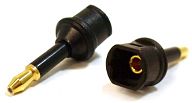
- (This is no longer true. The most recent Macs no longer have a built-in TOSLINK output, blame Apple.) Do you intend to use such a sound card to get TOSLINK output out of a regular Mac? There is a much simpler way. Perhaps you do not know that each recent Mac has a built-in optical output integrated in its 3.5mm line-out port, that will engage when the right type of plug is inserted. Simply use a 3.5mm adaptor as shown in the image to the right.
- Do you hope to just plug in the sound card, install the enabler, and get surround right away? It won't happen. You need to first go through the Audio MIDI Setup ritual.
- Do you hope to decode surround with these cards? It won't work. See below.
- Do you hope to get surround out of plain stereo, like iTunes or YouTube? It won't happen unless you do some serious voodoo. See below.
- Do you intend to use this device for ADAT optical input? It won't work. The CM6206, just like the optical input on every Mac, only supports S/PDIF which is an incompatible protocol. You need to buy an ADAT-specific sound card instead.
Download
You need OS X 10.5 or newer to make this work. It should work in 10.8, unless perhaps you enabled GateKeeper. Thanks to a donation by Mark Hempelmann I was motivated enough to wrap this program in a fully automatic daemon. All you need to do is run the installer and reboot, and your sound card should work. With that I mean you should get sound from it, but whether you can get surround from it depends entirely on whether your OS X sound settings are properly configured.
Download the cm6206 enabler (ZIP archive)
If you want to uninstall the enabler, all you need to do is delete the following two files:
  /Library/Application Support/CM6206
  /Library/LaunchDaemons/be.dr-lex.cm6206init.plist
Someone has made an ARM build of the binary, available here, that should be usable on M1 Macs running Monterey. Contact the author of that repository if you have problems with this build.
Beware: OS X 10.7 ‘Lion’ has a bug that requires the sound card to be connected at the moment the computer is booted or woken from sleep. Otherwise it is not available as a sound device. There is nothing I can do about this because it has nothing to do with the enabler. It seems to be caused by a quirky USB or audio driver in the operating system itself and will hopefully be fixed in an upcoming Lion update. Do not unplug the sound card once it works, or you will have to reboot/wake again after plugging it back in.
The source code (ZIP archive) is also available. Mind that I myself have not used the CM6206-based sound card for several years. Instead I bought a proper hardware 5.1 decoder connected through S/PDIF, which avoids all the problems with Audio MIDI Setup, lack of proper multi-channel support, and bugs in media players. It is possible this enabler will not work in the most recent Mac OS X versions. If this is the case, your best option is to download the source code and try to fix it yourself, because my motivation to work on this enabler is very low.
Setting up surround sound
Unfortunately, at the time of this writing it is still quite a hassle to get surround sound properly set up on OS X. Therefore I made a checklist of what you should do to get 5.1 sound out of any multi-channel sound card:
Instructions for configuring a multi-channel sound card in OS X
To test if all channels work, you can download the following AC3 test sound. You could also use it to roughly calibrate the volumes for each channel on your audio system.
Download 5.1 channel test file (ZIP archive)
I recommend Plex to play this file — and any movie with surround sound for that matter. Plex (or Plex Home Theater as it is called lately) is not a straightforward player like VLC. You must have Plex Media Server running and let it build a database of your movie collection, but once you get the hang of this it is a great media player. In Plex' preferences, you must set ‘Audio Output’ to “Analog,” ‘Speaker Configuration’ to “5.1” or “7.1” depending on your setup, and ‘Audio Output Device’ to “USB Sound Device”. You may have some difficulty finding where all these settings are scattered around depending on the version of Plex, but it is worth the effort.
VLC also has multi-channel output, but it is dodgy. The balance (volume) between center/front/surround tends to change with each movie you play, making it impossible to calibrate your setup. I suspect 5.1 streams (AC3, DTS) to contain a relative gain parameter for the rear/center channels which is ignored by VLC, causing the annoying changes in volume.
Caveats
Many people seem to be confused about the difference between sending surround sound as passthrough (through S/PDIF) and playing it as six or eight separate channels. As I have explained elsewhere, these are two entirely different situations. With this specific sound card you can do both, although on a regular Mac you do not need a USB sound card to do optical passthrough: simply use a tiny 3.5mm adaptor to connect a Toslink cable directly to the Mac's built-in line out port.
The CM6206 is not able to decode AC3 or DTS streams. It is a simple sound card with 6 or 8 output channels and a few input channels. Plugging an optical cable into the S/PDIF input if your card has one, will not cause decoded audio to come out of the outputs, nor can you get multi-channel output by sending an encoded 5.1 stream from your Mac, this will only produce noise on the Front channel. The software you use must support built-in 5.1 decoding to get multi-channel output out of your sound card. For instance VLC and the most recent version of Plex support it. There is no software that I know of, that can decode a Dolby or DTS signal coming in through the optical input and send the audio to the card's outputs (although in theory this could be possible).
Do not expect to get surround from stereo material. If you play music in iTunes or a YouTube video, it will still be stereo. An application must address all six or eight output channels to produce output on all speakers. When playing stereo sound, i.e. what almost every normal Mac application like iTunes produces, only your front left & right speakers will be used, not even your subwoofer unless your sound system has bass management — which it probably doesn't unless it is high-end. There are ways to get upmixing in MPlayer and even system-level upmixing by using Jack, but neither methods are really practical. Soundflower should also allow this in an easier way. All these solutions will however produce ‘fake’ surround, they will only replicate channels to put more of your loudspeakers to use. Getting plausible ‘real’ surround from stereo requires complex processing and is far from trivial. I do not know of any OS X software that can do this.
About the S/PDIF (Toslink) output: as far as I can tell, the CM6206 only supports 8 output channels, and on most cards only 6 of those are connected. There is no separate S/PDIF output channel, which is why you won't see it in the OS X control panel or Audio Midi Setup. The S/PDIF can only be turned on and off and is just a hardwired copy of the signal that goes to the Front channel. You can get AC3/DTS passthrough by configuring your media application to pass through the undecoded 5.1 stream. This makes the card's S/PDIF only really useful on a ‘hackintosh’ that doesn't have a built-in S/PDIF, because on a real Mac it's much simpler and cheaper to use the Mac's built-in S/PDIF through a 3.5mm jack adapter (although this has also disappeared now; never count on Apple if you need backwards compatibility).
To be honest, I do not recommend this kind of sound card to anyone who wants to get hassle-free surround sound on their Mac. These cards are most useful to people who want multiple sound channel output for special applications. But for simple 5.1 sound they are a pain in the ass because only few programs support them, and the ones that do often have bugs (e.g. VLC). If you want to connect your Mac to a surround system and you are doubting whether to buy either a multi-channel card like this or a stand-alone surround decoder connected through HDMI or S/PDIF, I can only recommend the latter. A stand-alone decoder will work without having to fiddle with complicated system settings or tweaking volume knobs with every new film you watch. On top of that, it has the added advantage that it can also be connected to any other device that has an HDMI or S/PDIF output.
The most sensible way to get encoded surround sound to an external device these days is through a HDMI cable. If you have a device with only an S/PDIF input, you can use a HDMI audio extractor that has an S/PDIF output.
Version history
- 1.0 (2009-06-11): Initial release.
- 2.0 (2011-01-31): Converted to daemon, added installer.
- 2.1 (2011-02-24): Prevented the program from delaying the computer while going to sleep.
- 2.1 (2011-04-09): Fixed permissions problem in installer.
Disclaimer
This program is free software: you can redistribute it and/or modify it under the terms of the GNU General Public License as published by the Free Software Foundation, either version 3 of the License, or (at your option) any later version.
This program is distributed in the hope that it will be useful, but WITHOUT ANY WARRANTY; without even the implied warranty of MERCHANTABILITY or FITNESS FOR A PARTICULAR PURPOSE. See the GNU General Public License for more details.
I am in no way affiliated with C-Media or the manufacturer of your specific sound card. This is just a hobby project.