 HTML TagWriter 3.8
About • Features • Download • Documentation • System requirements • Coming up… • Support
About
HTML TagWriter was an HTML editor that I once wrote for myself to make building my web site easier. It became quite versatile, so I released it to the public as a shareWare program. It was based on HyperCard, hence only runs in the ‘Classic’ Mac OS versions before OS X, or in the Classic environment that came with the earlier OS X versions. Classic is now completely obsolete, and so is this program. Even if it could be imported in a modern HyperCard derivative, it would not work properly because it relies heavily on XCMDs and XFCNs. You can still run HTML TagWriter through a PowerPC emulator like SheepShaver. Believe it or not, quite often I still use it in this manner to edit webpages.
The ShareWare fee for TagWriter used to be US$15 for a life-time registration, but now it is released in the public domain. In the utterly improbable case that you have used this program without ever paying for it and now you feel remorse, you could still donate to soothe your conscience ;)
Features
For those who know HyperCard, it may seem strange that it could be used to develop an entire text editor. I did push the boundaries of what could be achieved with HyperCard, and then some. I especially had to be creative to get beyond the dreaded 30kByte limit for scripts. The stack relied on a few XCMDs to extend functionality. This is a summary of features in the final version:
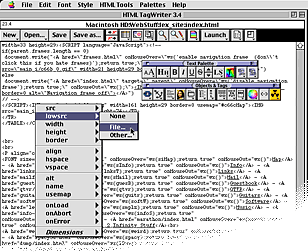
- Tool palettes that can be moved, docked, and mimimised. The palettes allow to insert many HTML tags.
- Contextual pop-up menus that can be invoked on all supported HTML tags by control-clicking on them. These menus allow to add, edit or remove tag attributes without typing.
- Embed a file in multiple documents, and when editing the file, all the pages that embed it are automatically updated.
- Support for reading and writing UTF-8 encoded files, within the limits of characters in the classic Mac OS character set. Conversion between Mac-style, UNIX-style, and Windows-style line endings (carriage returns, linefeeds, or both).
- Rudimentary support for Cascading Style Sheets (aka CSS). Styles can be easily applied through the contextual pop-up menus, even if they are defined in external style sheets.
- Follow hyperlinks while editing (both to other documents to edit, or external hyperlinks). Also easily jump to anchors or ID's within the same document, or create links to them.
- Basic support for creating links to JavaScript functions.
- An extensive search-and-replace that can batch process an entire directory with subdirectories.
- Check for broken local links (images included) in the current document, or across an entire website by exhaustively following links from a starting page.
- IMG tag placement with image preview and automatic setting of correct image dimensions.
- Launch or refresh the page being edited in an external web browser.
- Automatic generating and updating of tables-of-contents, and sorted multi-column lists.
- Insert and edit HTML colour codes with the standard Mac OS colour picker.
- Insert empty tables of any dimension, or convert comma- or tab-delimited text to tables.
- Rudimentary clickable image map editor.
- Highlight tags and/or links (not real-time because pretty slow).
- Text importer and converter with support for multiple character sets, converting text to HTML entities or stripping HTML formatting, and decoding WWW mail forms.
- Favourites and recently used file menus.
Download
Together with the woefully overdue 3.8 release, in March 2014 I released the editable development stack as well, for those who would be inclined to see how all of TagWriter's functionality could be implemented in a software environment rather unsuited for the task. Of course, the password protection has been lifted and the software is released in the public domain, regardless of any outdated licenses that may still be included with the program.
HTML TagWriter comes in the three classic flavours: the first is the normal distribition, a so-called “FAT binary” that will run on both PowerPC-based and 68K-based Macs. The second and third are a PPC-only and 68K-only binary that allow to save a few kBytes on those specific platforms. Finally, the raw development stack is also available together with some developer notes. The latter needs a full installation of HyperCard to be of any use.
Download HTML TagWriter FAT Binary (1192 kBytes) |
Download HTML TagWriter PPC Only (864 kBytes) |
Download HTML TagWriter 68K Only (742 kBytes) |
Download HTML TagWriter
Development stack
(188 kBytes)
The files are compressed with DropStuff 7. Stuffit Expander is required to unStuff the files. I am not sure what version will be required but you should have no problems finding one that works, if you are willing to run ancient Classic Mac software anyway.
Documentation
HTML TagWriter comes with elaborate help files, a list of new features, a tutorial, an (obviously utterly obsolete) introduction to HTML, a file with HTML tips & syntax, and a troubleshooting FAQ in TeachText format. The HTML files are also available here. Mind that the main documentation has not been entirely updated for version 3.8 — nobody will read it anyhow.
- TagWriter 3.8 Help
- Using HTML TagWriter
- New Features in version 3.8
- Tutorial
- A short intro to HTML
- HTML Tips
System requirements
This section may be fun to read for historians, or for those people who would be inclined to try to get this program running on a vintage Mac! HTML TagWriter shares its requirements with the HyperCard 2.4.1 runtime it is based on.
- A Mac with a 68030 processor at 16 MHz or better (everything from the SE/30 on), PowerMac recommended
- System 7.1 or newer
- A bit of disk space (3 MiB will do)
- 2.5 MiB of free RAM minimum, 4 MiB recommended
- Certain features require QuickTime 2.5 or newer (QT 3 or 4 recommended).
Important: In Mac OS 8 and 8.1, HTML TagWriter may crash while opening files if "Translate 'TEXT' documents" is active in "Mac OS Easy Open". To avoid problems, turn off this option in the Easy Open control panel.
Tip: The "Apple Menu Extension" control panel causes annoying delays in all applications, including HTML TagWriter, if you place an alias to your hard disk or a large folder with frequently edited files in the Apple menu. So unless you really can't live without such aliases, remove them from the menu.
For PPC Mac OS X users: This application runs fine in the Classic environment of Mac OS X, but you cannot launch documents in your Mac OS X browser, only in browsers within the Classic environment.
Coming up…
In the past, this section still hinted at the possibility that I would ever release a version 4 of HTML TagWriter, which would be a modern re-write from the ground up. I can now say with absolute certainty that this will never happen (at least not from my part).
Here is a small erratum in the current (and most likely last) release: going to an ID in an embedded file will not always work. To fix this, replace the following line in the ‘goToName’ method:
put offset("<A name=""e&nam"e,txt) into bgn
with:
put getID(nam,txt) into bgn
I have made some improvements to the stack that I'm still using and I might release this as a new version of the development stack, but I won't promise anything…
Support
In the unlikely case that you would still be using this software and you have found a horrible bug and you are unable to fix it yourself by editing the development stack, you can still mail me and perhaps I will actually fix it!
About • Features • Download • Documentation • System requirements • Coming up… • Support