 Radio Paradise Widget for Dashboard
Version 2.2.5
by Alexander Thomas (aka Dr. Lex)
(Click here to mail me)
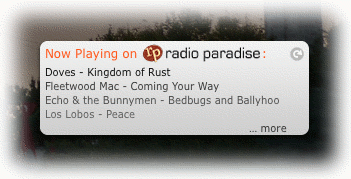
This is a widget for Mac OS X Dashboard. It shows what's currently playing on the internet radio station Radio Paradise. This widget does not play any music, it is meant as a companion to iTunes or another playback device tuned in to RP.
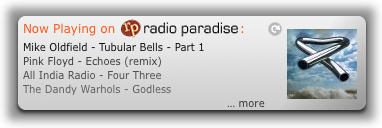
The display is similar to what used to be shown in the top right corner of the older RP website, and the playlist is updated in real-time. Just like on the website, you can click the song titles to go to the corresponding song comments page immediately. Hover over a song title to see its album name and release date. To show the album cover of the current song, click the right edge of the widget. Clicking the cover image hides it again.
Note that version 2.2.5 will pretty likely be the last update, besides maybe some trivial changes. Dashboard has been removed since OS X Catalina, and this widget also relies on a part of the legacy RP website (the ‘Chumby’ playlist file). Although the RP team is friendly enough to keep that site running as long as possible, at some point in time it will be shut down. So, enjoy this widget while it lasts. It still works perfectly with the live streams at the time of this writing (not so much in combination with the interactive stuff on the RP website itself).
I will keep this page up indefinitely (although it will probably be moved to an ‘obsolete’ section) just because the source code might be interesting for anyone having to implement something similar.
Download and Installation
Download the widget (ZIP archive)
Mac OS X between 10.4 Tiger and 10.14 Mojave is required (Dashboard has been discontinued from 10.15 on). Installing the widget is extremely straightforward in recent versions of OS X. Basically, keep opening the downloaded file until you see it in Dashboard, then drag it to where you want it.
If GateKeeper is enabled, you might need to make an exception in the Security & Privacy control panel for installing this widget. If you have problems installing, or keep seeing an old version, click the big ‘plus’ ⊕ icon in Dashboard's bottom-left corner, then click the minus ⊖, then click the ‘X’ button ⊗ of the RPWidget icon. Finally, reinstall. To be really sure, refresh the widget (click it and press Command-R) after instantiating the new widget in Dashboard.
If you still have problems, manually delete any old versions of RPWidget inside ~/Library/Widgets/ and /Library/Widgets/ (use ‘Go to Folder’ in the ‘Go’ menu of the Finder) and reinstall. If even that doesn't fix it, delete the folder ~/Library/Caches/com.apple.dashboard.client before reinstalling the widget.
About
Version 2 was a major rewrite. Instead of trying to directly clone a part of the RP website, it now uses an XML playlist. This has the advantage that diacritics are finally correctly displayed and more information can be shown, like the album title tooltips and optionally the album cover.
The current version of the widget tries to refresh the playlist as early as possible with a minimum of server requests (anyone interested may want to look at the source code, the algorithm is interesting to say the least). There should be no need to use the manual refresh button anymore. If you see this icon appear:  then most likely the widget got confused due to an error in the playlist (these do occur at least a few times per day) or an exceptional situation like an extremely long announcement. Refreshing will be inaccurate while this icon is visible, but it should correct itself after a few song changes.
You may also see this icon show up from time to time:  . It means a difference between the clocks of your computer and the RP server was detected. I don't know why, but the clock of the RP server itself seems unstable and jumps forward and back in time now and then. Don't worry, the widget is robust against this. If the icon stays visible all day, then probably your own computer's clock is wrong: try selecting a time server in your Date & Time system preferences to fix this.
You may notice that the playlist refreshes more slowly during typical peak-hour moments when there are many listeners. This is because the RP web server has trouble handling the load from all the browsers etc. refreshing at the same time. If you want to help Bill buy a faster server, don't forget that RP is entirely listener-supported!
The widget can be reset like any other widget, by clicking its window and then pressing ⌘-R, but you should only do this if you suspect it got messed up.
Version History
- 2.2.5 (2023/01): again fix the ‘more’ link to reflect the changed URL on the website.
- 2.2.4 (2022/10): update ‘more’ link to point to the ‘now playing’ page of the 2022 RP website overhaul. Thanks to the RP team for keeping the legacy playlist in working order!
- 2.2.3 (2019/01): update URLs to new website. Now relying on legacy website for playlist, see above note.
- 2.2.2 (2014/12): remember album cover visibility.
- 2.2.1 (2014/12): made album cover toggle area more visible.
- 2.2 (2014/12): album cover can now be toggled. Further improved refresh algorithm and made refreshing asynchronous.
- 2.1 (2014/11): added release year to album tooltips. Complete redesign of the refresh algorithm to make it more accurate and robust.
- 2.0 (2014/07): major rewrite using Chumby XML playlist. Accents are now displayed correctly, smarter artist/title cut-off, album title tooltips, and layout tweak.
- 1.0.5 (2014/07): fixed broken playlist update, updated logo.
- 1.0.4 (2008/10): fixed text charset (diacritical marks should be correctly displayed, although in practice they aren't) + wider window.
- 1.0.3 (2006/01): added routines to suspend the widget when dashboard is inactive, so it doesn't consume cpu and network bandwidth in the background.
- 1.0.2 (2005/12): added the now mandatory 'AllowNetworkAccess' to the widget's Info.plist.
- 1.0.1 (2005/11): some cosmetic adjustments.
- 1.0.0 (2005/10): initial release.
This software is released under the GNU General Public License.
There is no guarantee for fitness for any purpose. This widget might make your computer explode, or turn your pets into rabid killing machines, and the new refresh algorithm might become self-aware and refuse to open your pod bay doors. Use at your own risk. But for me, it appears to work :)
P.S.: If you arrived here through the Apple downloads site and are wondering about this being a product of the Catholic University of Leuven: it is not. Despite an attempt to change it, the company name from my former ADC profile was used.